In 2016, I purchased from eBay this arranger module in very clean condition for around $300. Information on GEM products is sparse. Italian company went out-of-business some time in the 2000's. Back in its day sometime in the mid to latter 1990's, I am guessing it retailed for around $1,500 US.
The 280 mA 4.8 Volt NiCad rechargeable battery failed. I unsoldered it and soldered in a new 330 mA 4.8 Volt NiMH battery. This battery powers the arranger's memory to retain arranger settings when powered off. (Unit must remain plugged in with A.C. power to it to keep this battery charged.) This replacement is safe as the charging requirements are the same for HiMH as it is for NiCad.
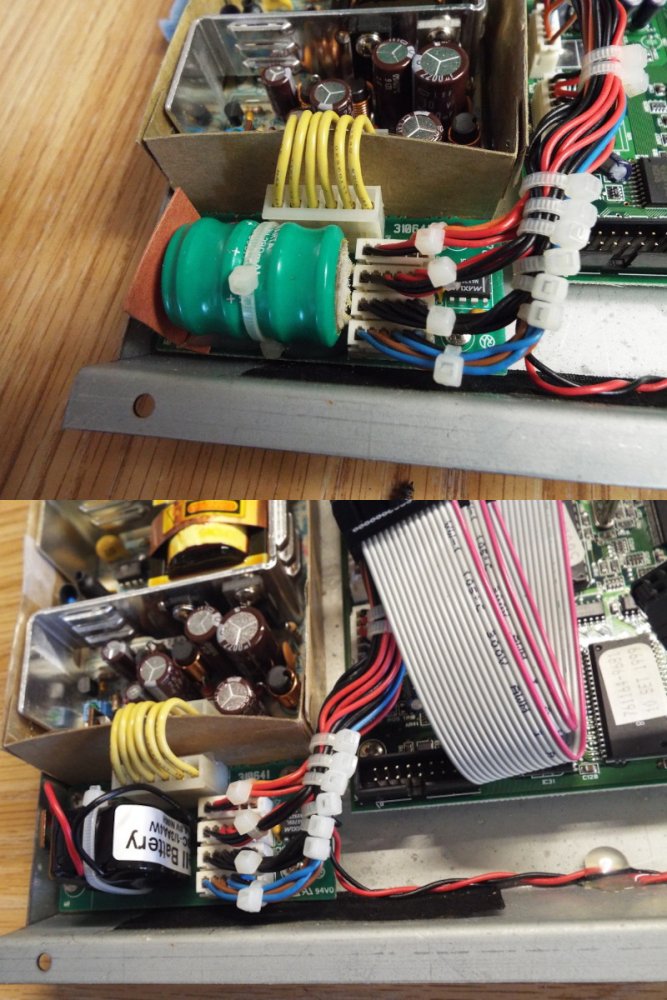
Old 280 mAH NiCad battery above, new 330 mAH NiMH battery soldered in its place.
I replaced the 500 megabyte IDE hard drive with a 1.0 gigabyte CF card mounted in an IDE adapter. This doubled the arranger's storage capacity and now, the HD operates at memory speeds instead of the slower hard disk transfer speeds.
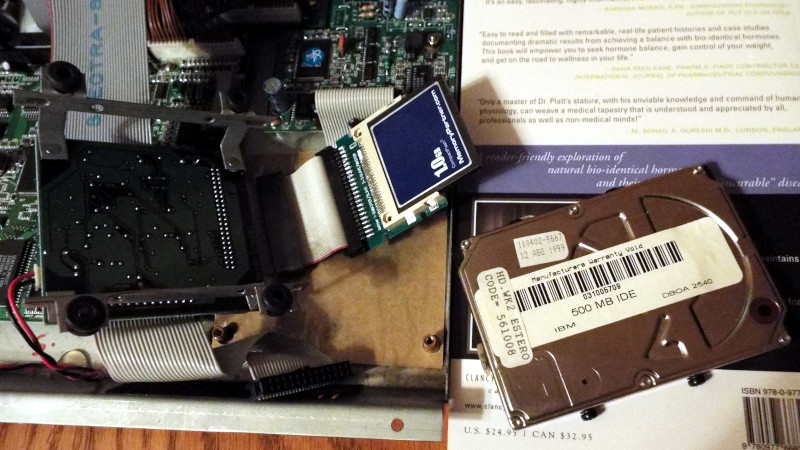
Left is the 3.5-in. frame where the 500 MB IDE old hard drive was mounted, with a new CF adapter and 1.0 GB card mounted. Right is the old HD it replaced.
I purchased the 1.0 GB CF from a major on-line US memory sales store, who had new CF's meeting earlier standards. They were a touch more in cost than other stores but were reputable, an importance in obtaining trustworthy reliable hardware.
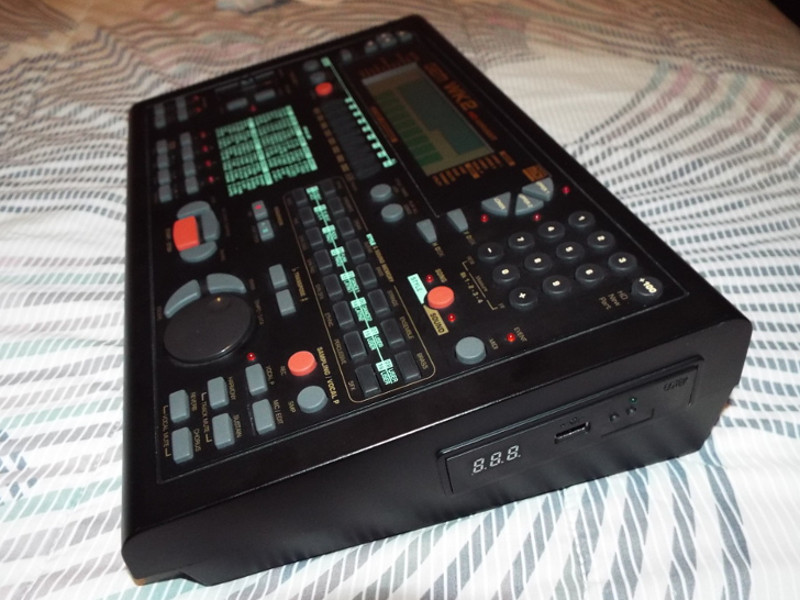
I also replaced the 3.25-in. 1.44 MB floppy disk drive with a GoTEK USB stick floppy disk emulator.
The utility software that formats the USB memory stick into 1.44 MB partitions and copies a floppy disk into one of its partitions did not work on Windows XP. I found a free software download from a supplier of another USB emulator, however it allowed 99 floppy partitions on a USB stick verus 999 floppy disk partitions. However for my purposes, this was acceptable.
I purchased on-line from a European source an aftermarket WK2 styles library with about 200 different styles. Then on the PC, loaded my USB stick with the styles. Once loaded, I plugged the stick into the USB emulator.
The numbers lit on the GoTEK indicate which floppy bank has been selected from the USB stick. Then I used the arranger's download feature to copy the styles on selected floppy partition to a new floppy memory partition on the arranger's hard disk. (The hard disk was formatted as floppy partitions.) I would give the new HD partition an 8 letter name (MS-Dos naming convention). Then copy the up to 8 styles from the GoTEK floppy partition to the HD partition.
Thus I added new life to this arranger with these repairs and updates. I have used several keyboards as controllers to this arranger. First was a Yamaha QS300 workstation, then my Roland GW7 arranger keyboard.
The 280 mA 4.8 Volt NiCad rechargeable battery failed. I unsoldered it and soldered in a new 330 mA 4.8 Volt NiMH battery. This battery powers the arranger's memory to retain arranger settings when powered off. (Unit must remain plugged in with A.C. power to it to keep this battery charged.) This replacement is safe as the charging requirements are the same for HiMH as it is for NiCad.
Old 280 mAH NiCad battery above, new 330 mAH NiMH battery soldered in its place.
I replaced the 500 megabyte IDE hard drive with a 1.0 gigabyte CF card mounted in an IDE adapter. This doubled the arranger's storage capacity and now, the HD operates at memory speeds instead of the slower hard disk transfer speeds.
Left is the 3.5-in. frame where the 500 MB IDE old hard drive was mounted, with a new CF adapter and 1.0 GB card mounted. Right is the old HD it replaced.
I purchased the 1.0 GB CF from a major on-line US memory sales store, who had new CF's meeting earlier standards. They were a touch more in cost than other stores but were reputable, an importance in obtaining trustworthy reliable hardware.
I also replaced the 3.25-in. 1.44 MB floppy disk drive with a GoTEK USB stick floppy disk emulator.
The utility software that formats the USB memory stick into 1.44 MB partitions and copies a floppy disk into one of its partitions did not work on Windows XP. I found a free software download from a supplier of another USB emulator, however it allowed 99 floppy partitions on a USB stick verus 999 floppy disk partitions. However for my purposes, this was acceptable.
I purchased on-line from a European source an aftermarket WK2 styles library with about 200 different styles. Then on the PC, loaded my USB stick with the styles. Once loaded, I plugged the stick into the USB emulator.
The numbers lit on the GoTEK indicate which floppy bank has been selected from the USB stick. Then I used the arranger's download feature to copy the styles on selected floppy partition to a new floppy memory partition on the arranger's hard disk. (The hard disk was formatted as floppy partitions.) I would give the new HD partition an 8 letter name (MS-Dos naming convention). Then copy the up to 8 styles from the GoTEK floppy partition to the HD partition.
Thus I added new life to this arranger with these repairs and updates. I have used several keyboards as controllers to this arranger. First was a Yamaha QS300 workstation, then my Roland GW7 arranger keyboard.